
Devlog 3: Cameras & jumps
Happy February! I hope the world is treating you well. ❤️
It’s a cliché at this point, but I’ve got a fresh filter coffee in my favourite mug, Lofi Girl on the TV, and I’m ready to draw a line under the last few weeks.
Broad goals
Last time we talked, my broad goals were to build…
- A camera that:
- Follows the player character.
- Can be directed to lower when the player is on a ledge.
- Can be locked to a specific region when the player enters an area.
- A jump that:
- Has some lenience if the player pushes
jumpshortly after walking off a ledge (i.e. coyote time). - Has some lenience if the player pushes
jumpin the air just before they touch the ground (i.e. buffer time).
- Has some lenience if the player pushes
I’m calling the first pass of these done! Some bits are jankier than others, but for a first pass? Definitely done.
But first… let’s sort out this resolution.
Resolution
Back in January, I was torn between 320×180 and 480×270, but I settled on 480×270 for the time being:
320×180 is such a classic resolution, with Celeste, Animal Well and Pipsqueak absolutely rocking it, and I probably would’ve settled on it by default not for Scourgebringer.
As best I can figure out, Scourgebringer runs at 480×270. It’s still got those crunchy pixels, but you can fit a few more of them on-screen than 320×180. 640×360, of course, can fit a lot more pixels, but there’s no crunch. I want crunch.
The truth is, writing that at the time really made me second-guess myself. I hinted at my reservations with:
The major downside of 480×270 vs 320×180 is that it doesn’t scale to 720p or 1440p – but I’m not terribly worried about that right now.
…but, dear reader: I was worried about it.
First worry: 1440p
In the latest Steam Hardware Survey (January 2026, at the time of writing), 1920×1080 is the most popular screen resolution at 52%, but 2560×1440 is second at 21% – and up from the previous survey. Less than 5% of the gamers surveyed play in 4K.
My gut tells me 1440p is going to get more and more popular as folks want to bump from 1080p but can’t afford the upgrades to 4K. It’s going to be a long time before AI data centres stop hoovering up silicon, so gamers will be making do with what they can get – and 1440p will be the best upgrade that most folks can get. Just a hunch.
Second worry: 800p
I love my Steam Deck. Love it! The only reason I don’t play it more often is my crippling misophonia needs me to wear noise-cancelling headphones all the time, and Bluetooth lag is rotten. I’m pretty sure my Bose QuietComfort Ultra support noise cancellation via the cable, but I’m not sure where that cable is in my den. I need to sort that out.
But – my point is, it’s super important to me that the game plays great on my favourite console, which means the game needs to have perfect integer scaling that fits a 1280×800 screen as fully as possible.
Now, scaling 480×270 into 1280×800 is rotten:
| Multiplier | Resolution | Wasted screen height |
|---|---|---|
| ×1 | 480×270 | 530 pixels / 66% of the screen’s height |
| ×2 | 960×540 | 260 pixels / 32% of the screen’s height |
| ×3 | 1440×810 | Doesn’t fit |
I’d need to choose between non-integer scaling (which I’m sure is probably fine in reality, but I’m not into it) or lose a third of the screen to an empty border. Speaking as someone who believes some borders do far more harm than good, 480×270 isn’t going to cut it.
Not a worry: 720p
As for 480×270 not scaling into 720p… I’m actually okay with that. I feel like 720p’s days are numbered.
If I was starting this game ten years ago then for sure I’d care, because I’d want the game on the Nintendo Switch. But now, with the Switch 2 running at 1080p, my gut tells me that’s last we’re going to see of 720p.
Not even a quarter of a percent of Steam players use 720p, and that’s dropping too. It’s probably still worth targetting for mobile games, but I don’t know because I’m not interested. For PC and console gaming, I feel like 720p’s done.
It’s 320×180, then
So, after that mathematical marathon, I’m calling the 480×270 experiment done and I’m committing to 320×180.
It’s a lower resolution than I’d like, but it’s closer to the image in my head than 640×360 would give me, and it scales perfectly (or at least, well enough) to all the screens I care about:
| Multiplier | Resolution | Screen |
|---|---|---|
| ×1 | 320×180 | |
| ×2 | 640×360 | |
| ×3 | 960×540 | |
| ×4 | 1280×720 | Close enough to 800p for Steam Deck |
| ×5 | 1600×900 | |
| ×6 | 1920×1080 | Nintendo Switch 2 and 1080p on PC and consoles |
| ×7 | 2240×1260 | |
| ×8 | 2560×1440 | 1440p on PC and consoles |
| ×9 | 2880×1620 | |
| ×10 | 3200×1800 | |
| ×11 | 3520×1980 | |
| ×12 | 3840×2160 | 4K on PC and consoles |
Perfect! To accommodate the slightly lower resolution, I also decreased the tile size from 16×16 to 8×8. The most unexpected side effect of that, which surprised me at the time but is super obvious in hindsight, is that the file size of my map chunks increased despite their pixel size decreasing. That’s because each chunk records a byte for each tile’s source texture index, and there are more tiles now, hence more bytes. But I’ll get into those compiled map files later.
With the resolution settled, let’s talk about the camera.
A smooth camera
When I say this game is a true pixel art game, I mean every pixel is perfectly aligned on a grid and objects move in perfect pixel increments. When a character moves from left to right, there’s no point where any of their pixels partially obscure any background pixels. It’s old-school, and not everyone likes it, but that’s okay. I’m not building this game for them.
But, that said… a camera moving around in perfect pixel increments just looks awful. It’s too jarring. Games like Animal Well avoid that by moving the player between distinct rooms. The camera never pans; it jumps from one room to the next. I really like that as a player, and I super like it as a developer. Oh, it would make my life so much easier! Don’t think for a second that I’m not tempted. But I want to give this one-shot open-world a try, so I’m sticking with it.
So, to avoid the jarring of a pixel-perfect camera, the camera isn’t pixel-perfect. The camera is the only entity that moves in “screen” pixels rather than “game” pixels.
I already had the foundations for this in place since the beginning of development. After the game’s update loop, it renders everything to a 320×180 pixel texture off-screen, then performs an integer scale of that texture up to the viewport’s resolution and renders that to the screen. Everything inside the texture renders pixel-perfectly, and the texture itself can be positioned at sub-game-pixel positions by offsetting it within the viewport.
Say the game is being rendered at ×8 resolution for 1440p. If the camera needs to be positioned at 54.25×68.75 exactly, it renders the game within the texture at 54×68 “game” pixels, then offsets the texture by 2 “screen” pixels to the left (because 2 is 0.25 of 8) and 6 “screen” pixels down (because 6 is 0.75 of 8).
Got it? Good.
A bounded camera
If I want the camera to follow the player as they explore the world, why would I also want to restrict where the camera can go?
Let’s say the player is walking through this corridor:
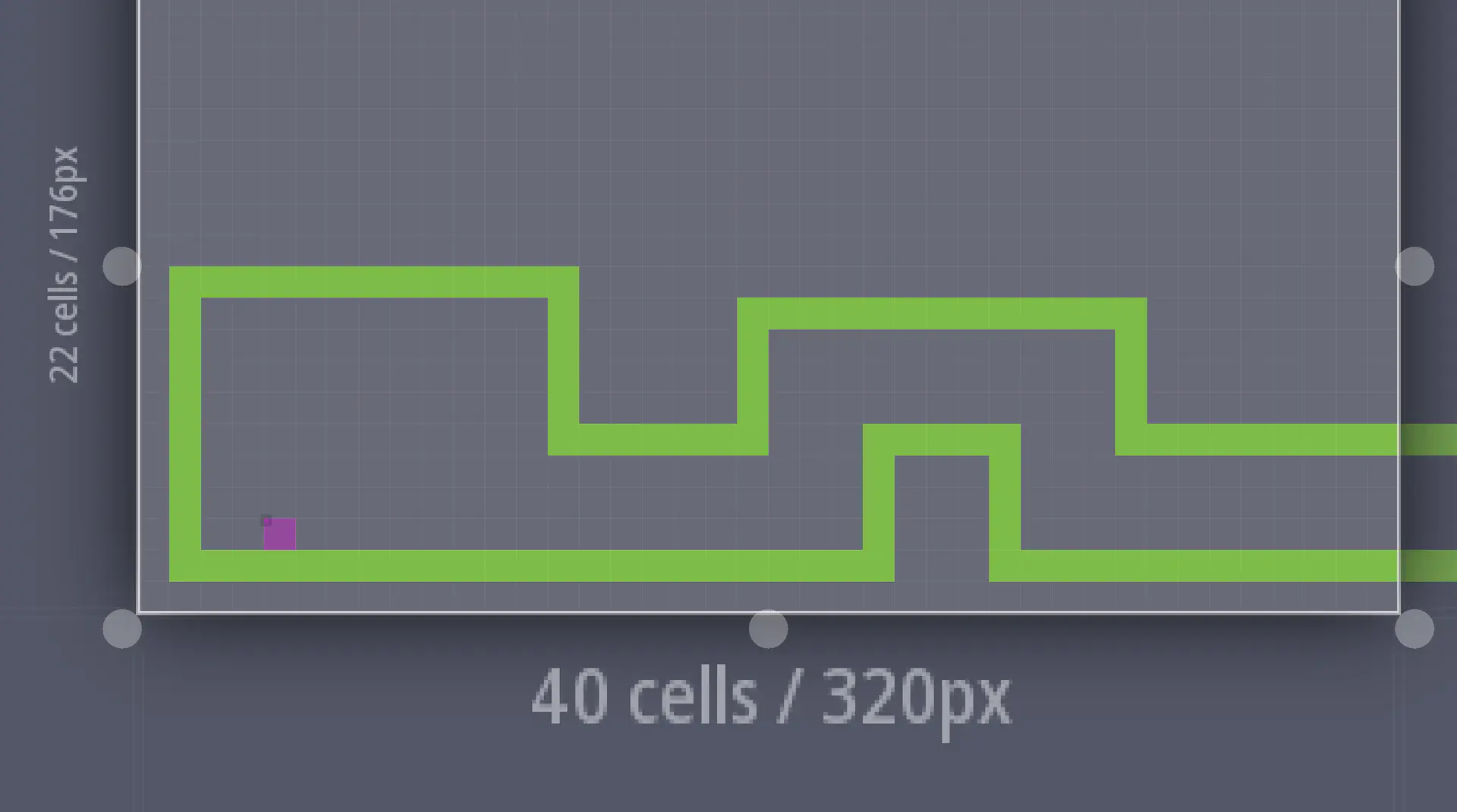
Generally, we want the camera to keep the player near the centre of the screen. So, generally, if the player jumped onto that hill in the road, we’d want the camera to slide up to follow them.
Generally, yes. But in this case, moving the camera up or down won’t reveal any more of the map. There’s nothing up or down there. Keeping the camera locked vertically on that corridor keeps the relevant stuff visible and just feels better.
Likewise, let’s say you’re climbing this tower:
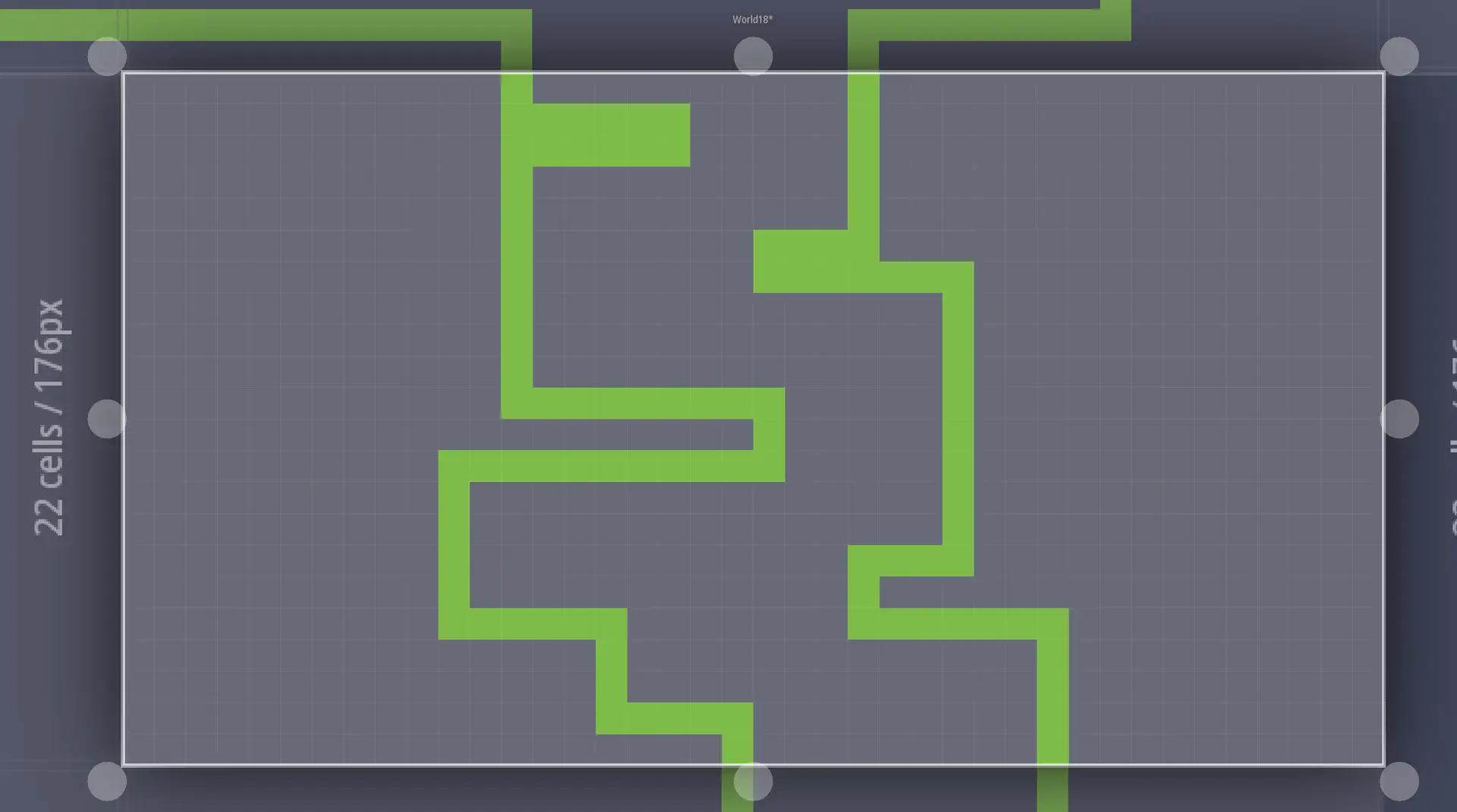
Generally, we want the camera to keep the player near the centre of the screen. So, generally, if the player ran left or right, we’d want the camera to slide horizontally to follow them.
Generally, yes. But in this case, moving the camera left or right won’t reveal any more of the map. There’s nothing there. Keeping the camera locked horizontally on that tower keeps the relevant stuff visible and just feels better.
My first pass at bounding the camera feels right in theory, but it’s janky in play so it needs some tuning for sure.
In LDtk, I added a new integer grid with four values for the camera’s top (red), bottom (blue), left (cyan) and right (yellow) boundaries, then drew them out:
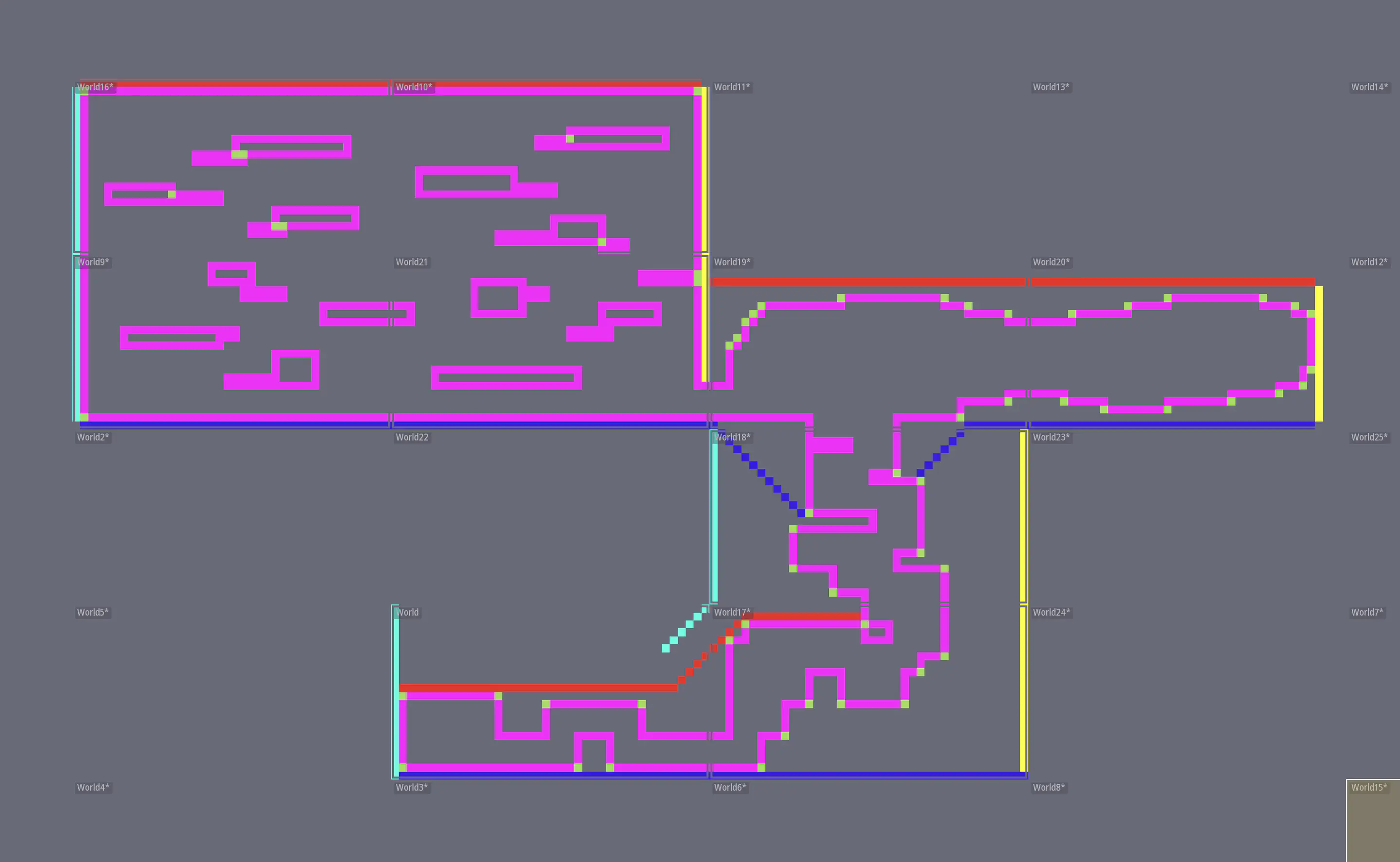
During each frame, the camera runs through a series of systems to figure out where it needs to be:
CameraTargetsets the camera’s desired position to the centre of its target entity (i.e. the player).OffsetCameraForFacingDirectionoffsets the camera slightly left or right depending on the direction that the target is facing.CameraBoundariesfinds the target entity, scans the area to find the nearest boundaries, and adjusts itself to avoid crossing them.SmoothCameraPositionsmoothly moves the camera from its current position towards the new desired position.
The result technically works, but definitely needs some tuning:
Good enough for now, though!
The map chunk file format
Last month, the map was described on-disk as a set of chunks, each a binary file containing:
- 880× (one for each of the chunk’s 40×22 tiles) bytes to describe (from left to right, top to bottom) the texture to render from the greybox tile set.
- 880× bytes to describe whether each tile is a collision or not.
When I came to add the camera boundaries to the map compiler, I realised it was super-wasteful to add 880 more bytes to every chunk whether they had boundaries or not. That made me realise that I already had a ton of empty chunks that were full of zeroes that the game was spending time loading. If I added more layers and kept following this pattern, every chunk would get bigger and bigger whether it needed to or not.
Now, I don’t really care about the disk space being used. A four kilobyte file versus a two kilobyte file ain’t worth sweating about. But the game streams a lot of files a lot of the time, and I don’t want to hog disk IO just to read zeros.
So, I spent a couple of days in the compiler and reader to clean up the file format a bit. Now, from beginning to end, the chunks are:
- An unsigned 16-bit integer to describe the number of bytes to read for the camera bounds layer.
- An unsigned 16-bit integer to describe the number of bytes to read for the collisions layer.
- An unsigned 16-bit integer to describe the number of bytes to read for the tiles layer.
- All the bytes that describe the camera bounds.
- All the bytes that describe the collisions.
- All the bytes that describe the tiles.
Sure, it only shaved a few kilobytes off the existing chunks, but it should prevent the file sizes exploding as I add more layers in the future.
Player spawn position
The player’s spawn position used to be hard-coded, which was fine when the map was small – but since I started experimenting with different layouts and shifting tiles around, it was a pain in the bum to keep spawning inside collisions.
So now, the LDtk map has an entities layer, with just a single entity for the player’s spawn position.
As I add more entities, they’ll probably get added to each chunk’s binary file. For the player’s spawn position, though, I didn’t want to have to scan every file to find it – so this one gets written to the map’s metadata file. It’s the first external file that the game reads on startup, and discovering that position now triggers the creation of the player entity and camera.
You wouldn’t tell from looking, but it’s a heck of a time saver!
The tools you use don’t matter, until they do
This isn’t going to be a rant. It’s just an anti-recommendation.
I’ve been trying Craft as a way of sharing notes between my phone and laptops. It’s lovely for everyday casual notes, but I need to throw out a strong anti-recommendation for technical writers – and that includes you, game devs.
Craft will take every opportunity it can to replace your text with emojis, and you can’t stop it. When I was drafting this post, I tried to type:
(2 is 0.25 of 8)
…but Craft replaced it with:
(2 is 0.25 of 😎
You can’t undo it. You can’t turn it off. It’s a feature, not a bug.
I filed a support ticket to be sure, and they confirmed:
Hi Cariad,
Thanks for reaching out! Unfortunately, there’s currently no setting in Craft to disable the automatic emoticon-to-emoji conversion.
We understand this can be frustrating, especially for technical writing where characters like 8) need to stay as-is. We’ve passed this along as a feature request to our team.
They suggested some workarounds, but workarounds suck when you’re brain-dumping in flow state. I’m keeping an eye out for a note-taking platform to replace Craft, and until they fix it I wouldn’t recommend any technical writers use it. It’s beautiful, and I’m gutted, but I can’t use a writing app that I need to fight and coerce to keep my text as I write it.
Mental health
I’ll be real with you. I know I can trust you. I haven’t felt great about this project over the last few weeks.
I know I’ve made progress, but it doesn’t feel like much. It doesn’t feel like enough, you know?
It doesn’t always feel great to spend a week in the innards of the map compiler without anything real to show for it. Sometimes, it feels positively awful to spend a week on a camera bounding system that’s all janked up.
In my brain, I know this is the nature of software development. But in my heart, even after building software professionally for over twenty years, it still hurts.
There are days I wonder if I’d be happier if I dropped this custom engine and moved back to Unity or Godot, or learned some other engine for a bit.
It’s been tempting, for sure, but I’m not going to. I’d have to make too many compromises on the vision I’ve got for the game.
But also… is that vision really going to be worth the pain? I know I’m building a game that I’d want to play, but I have to admit that my loves are niche. I don’t think I can look you in the eye and say it won’t hurt if I release this thing and the world collectively shrugs at another mediocre indie pixel-art platformer.
I dunno, buddies. I know I have bipolar disorder. I know I get the morbs. I can handle making a bad decision, but I can’t shake the feeling that I’m a bit of an idiot. I could use a little bit of success to pull me out of it.
What’s next?
I’ve got a bit of the old “blank canvas” paralysis going on right now, so I’m not entirely certain where to go next.
I think I’ll take a shot at some interactable objects, like:
- A signpost you can interact with to read.
- A lever you can interact with to move an obstacle.
- A character you can interact with to start a conversation.
Take care of yourselves, live with love and solidarity, and I’ll see you later! ❤️